axum-admin
A modern admin dashboard framework for Axum.
Register your entities and get a full CRUD dashboard — search, filtering, pagination, bulk actions, custom actions, and built-in authentication — with zero frontend build step.
Inspired by Django Admin and Laravel Nova.
Features
- CRUD out of the box — list, create, edit, delete for any entity
- Server-side rendering via MiniJinja, no JS framework required
- HTMX + Alpine.js embedded, no CDN or build step
- Session-based auth with argon2; swap in your own backend
- RBAC via Casbin — per-entity permissions tied to user roles
- Sidebar groups with collapsible sections and custom icons
- Filters, search, column sorting, pagination
- Bulk actions (delete, CSV export) and per-record custom actions
- Lifecycle hooks:
before_save,after_delete - Template override support
- ORM-agnostic via
DataAdaptertrait - First-party SeaORM adapter behind the
seaormfeature flag
Installation
Add axum-admin to your Cargo.toml:
cargo add axum-admin --features seaorm
cargo add axum tokio --features tokio/full
Or add manually:
[dependencies]
axum-admin = { version = "0.1", features = ["seaorm"] }
axum = { version = "0.7", features = ["macros"] }
tokio = { version = "1", features = ["full"] }
Feature Flags
| Flag | Description |
|---|---|
seaorm | Enables SeaORM adapter, RBAC via Casbin, and SeaOrmAdminAuth |
Without the seaorm feature, you must provide your own DataAdapter and AdminAuth implementations.
Requirements
- Rust 1.75+
- PostgreSQL (when using the
seaormfeature)
Quick Start
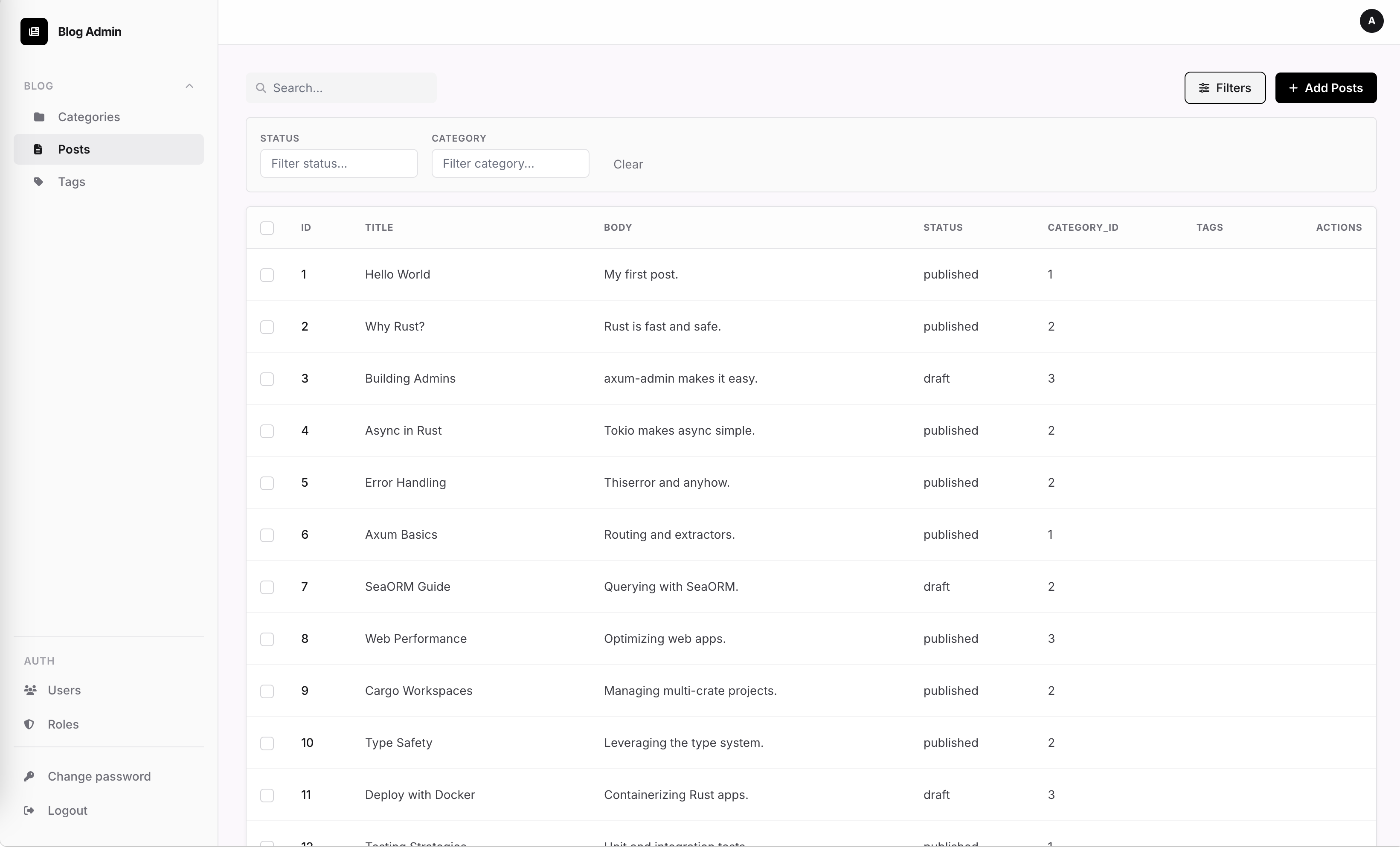
This guide gets you from zero to a running admin dashboard in 4 steps.
1. Set the database URL
export DATABASE_URL=postgres://user:password@localhost:5432/myapp
2. Create the admin user
SeaOrmAdminAuth::new() runs migrations automatically, then ensure_user seeds the first account (idempotent — safe to call on every startup):
use axum_admin::adapters::seaorm_auth::SeaOrmAdminAuth;

let auth = SeaOrmAdminAuth::new(db.clone()).await?;
auth.ensure_user("admin", "secret").await?;
3. Register entities and mount the router
use axum_admin::{AdminApp, EntityAdmin, Field};
use axum_admin::adapters::seaorm::SeaOrmAdapter;

let app = AdminApp::new()
    .title("My App Admin")
    .prefix("/admin")
    .seaorm_auth(auth)
    .register(
        EntityAdmin::new("posts")
            .label("Posts")
            .adapter(Box::new(SeaOrmAdapter::<post::Entity>::new(db.clone())))
            .field(Field::text("title").label("Title"))
            .field(Field::textarea("body").label("Body"))
    )
    .into_router()
    .await;

let router = axum::Router::new().merge(app);
4. Start the server
let listener = tokio::net::TcpListener::bind("0.0.0.0:3000").await?;
axum::serve(listener, router).await?;
Visit http://localhost:3000/admin and log in with the credentials from step 2.
Blog Example
The examples/blog/ directory contains a complete working example using PostgreSQL and SeaORM.
Prerequisites
- Docker (for the database)
- Rust 1.75+
Running the example
cd examples/blog
docker compose up -d db     # start PostgreSQL
cargo run                   # run migrations + start server
Visit http://localhost:3000/admin and log in with admin / admin.
What's included
Categoryentity with id and name fields, searchable by namePostentity with title, body, status, a foreign-key to Category, and a many-to-many relationship to Tags; searchable by title and body, filterable by status and categoryTagentity with id and name fields, searchable by name- All three entities grouped under a "Blog" sidebar section
- SeaORM migrations for the blog tables
- Full CRUD for all entities
See examples/blog/src/admin.rs for the full registration code.
Configuration Options
All options are set via builder methods on AdminApp.
AdminApp builder
AdminApp::new()
    .title("My App")                    // browser tab title and sidebar header (default: "Admin")
    .icon("fa-solid fa-bolt")           // Font Awesome icon class for the sidebar header (default: "fa-solid fa-bolt")
    .prefix("/admin")                   // URL prefix for all admin routes (default: "/admin")
    .auth(auth_backend)                 // set AdminAuth implementation (Box<dyn AdminAuth>)
    .seaorm_auth(auth)                  // set SeaOrmAdminAuth (seaorm feature — wires auth + enforcer)
    .upload_limit(20 * 1024 * 1024)    // max multipart upload size in bytes (default: 10 MiB)
    .register(entity_or_group)          // register an EntityAdmin or EntityGroupAdmin
    .template(name, content)            // override a built-in template by name
    .template_dir(path)                 // load template overrides from a directory
Method reference
| Method | Parameter | Default | Description |
|---|---|---|---|
title | &str | "Admin" | Sets the browser tab title and sidebar header text |
icon | &str | "fa-solid fa-bolt" | Font Awesome icon class shown in the sidebar header |
prefix | &str | "/admin" | URL prefix for all admin routes |
auth | Box<dyn AdminAuth> | — | Sets the authentication backend |
seaorm_auth | SeaOrmAdminAuth | — | SeaORM feature: wires auth and Casbin RBAC enforcer together |
upload_limit | usize (bytes) | 10 * 1024 * 1024 | Maximum multipart body size in bytes |
register | EntityAdmin or EntityGroupAdmin | — | Registers an entity or group for display in the admin |
template | (&str, &str) | — | Override a built-in template by name (e.g. "layout.html") |
template_dir | impl Into<PathBuf> | — | Load template overrides from a directory; later calls take precedence |
Environment variables
| Variable | Description |
|---|---|
DATABASE_URL | PostgreSQL connection string, required when using the seaorm feature |
Feature flags
| Flag | Description |
|---|---|
seaorm | Enables SeaORM adapter (SeaOrmAdapter), auth (SeaOrmAdminAuth), and RBAC via Casbin |
Mounting
AdminApp::into_router() is async and returns an axum::Router:
let admin_router = AdminApp::new()
    .title("My App")
    .auth(Box::new(my_auth))
    .register(my_entity)
    .into_router().await;

let app = axum::Router::new()
    .merge(admin_router);
Note:
.auth()(or.seaorm_auth()when using theseaormfeature) must be called beforeinto_router(), or it will panic at startup.
AdminApp
AdminApp is the top-level builder for an axum-admin application. It collects configuration, registered entities, and authentication, then produces an Axum Router.
use axum_admin::AdminApp;

let router = AdminApp::new()
    .title("My App")
    .prefix("/admin")
    .auth(Box::new(my_auth))
    .register(my_entity)
    .into_router()
    .await;
Constructor
AdminApp::new() -> Self
Creates an AdminApp with defaults:
| Field | Default |
|---|---|
title | "Admin" |
icon | "fa-solid fa-bolt" |
prefix | "/admin" |
upload_limit | 10485760 (10 MiB) |
auth | None (must be set before into_router) |
Builder Methods
title(self, title: &str) -> Self
Sets the application name shown in the sidebar header and browser title.
.title("My Admin")icon(self, icon: &str) -> Self
Sets the Font Awesome icon class for the app logo in the sidebar. Defaults to "fa-solid fa-bolt".
.icon("fa-solid fa-database")prefix(self, prefix: &str) -> Self
Sets the URL prefix for all admin routes. Defaults to "/admin".
.prefix("/staff")register(self, entry: impl Into<AdminEntry>) -> Self
Registers an EntityAdmin or EntityGroupAdmin with the app. Can be called multiple times.
.register(EntityAdmin::new::<()>("posts"))
.register(my_entity_group)
auth(self, auth: Box<dyn AdminAuth>) -> Self
Sets the authentication provider. Required before calling into_router(). Panics at router construction if not set.
.auth(Box::new(DefaultAdminAuth::new("admin", "secret")))seaorm_auth(self, auth: SeaOrmAdminAuth) -> Self
(Requires seaorm feature)
Configures SeaORM-backed authentication with full RBAC support. Automatically sets the enforcer and auth provider. This is the recommended auth method when using SeaORM.
.seaorm_auth(SeaOrmAdminAuth::new(db.clone()).await?)upload_limit(self, bytes: usize) -> Self
Sets the maximum multipart upload body size in bytes. Defaults to 10 * 1024 * 1024 (10 MiB).
.upload_limit(50 * 1024 * 1024) // 50 MiBtemplate(self, name: &str, content: &str) -> Self
Overrides a built-in template or adds a new one by name. Template names must match the filenames used by the renderer (e.g. "home.html", "layout.html", "form.html"). Inline templates set via this method take precedence over template_dir templates.
.template("home.html", include_str!("templates/home.html"))template_dir(self, path: impl Into<PathBuf>) -> Self
Loads templates from a directory on disk at startup. Any .html file whose name matches a built-in template overrides it; unknown names are added as new templates. Multiple directories can be registered; later calls take precedence over earlier ones, and .template() always wins over .template_dir().
.template_dir("templates/admin")Finalizer
async fn into_router(self) -> Router
Consumes the AdminApp and returns a configured Axum Router with all admin routes, static assets, middleware, and authentication layers applied.
Panics if .auth() (or .seaorm_auth()) was not called before this method.
let router = AdminApp::new()
    .title("My App")
    .auth(Box::new(my_auth))
    .register(users_entity)
    .into_router()
    .await;

let app = Router::new().merge(router);
EntityAdmin
EntityAdmin and EntityGroupAdmin are the core types for registering entities with the admin panel.
EntityAdmin
Represents a single data model in the admin panel — its list view, form fields, search configuration, custom actions, and access permissions.
use axum_admin::{EntityAdmin, Field, FieldType};

let posts = EntityAdmin::new::<()>("posts")
    .label("Blog Posts")
    .icon("fa-solid fa-newspaper")
    .adapter(Box::new(my_adapter))
    .field(Field::new("title", FieldType::Text))
    .field(Field::new("body", FieldType::Textarea))
    .list_display(vec!["title".into(), "created_at".into()])
    .search_fields(vec!["title".into(), "body".into()]);
Constructors
EntityAdmin::new<T>(entity: &str) -> Self
Creates a new EntityAdmin for the given entity name. The type parameter T is a marker and can be () when not using SeaORM entity inference.
Defaults:
| Field | Default |
|---|---|
label | Auto-generated from entity name (e.g. "blog_posts" → "Blog Posts") |
icon | "fa-solid fa-layer-group" |
pk_field | "id" |
bulk_delete | true |
bulk_export | true |
EntityAdmin::from_entity<E>(name: &str) -> Self
(Requires seaorm feature)
Creates an EntityAdmin with fields inferred from a SeaORM entity type. Field types are derived automatically from column definitions.
EntityAdmin::from_entity::<entity::post::Entity>("posts")Builder Methods
label(self, label: &str) -> Self
Overrides the human-readable label shown in the sidebar and page titles.
.label("Blog Posts")icon(self, icon: &str) -> Self
Sets the Font Awesome icon class for this entity in the sidebar and dashboard. Defaults to "fa-solid fa-layer-group".
.icon("fa-solid fa-newspaper")pk_field(self, pk: &str) -> Self
Overrides the primary key field name. Defaults to "id".
.pk_field("uuid")group(self, group: &str) -> Self
Assigns this entity to a named sidebar group. Entities sharing the same group label are collapsed under a single expandable section. Using EntityGroupAdmin is usually more ergonomic for this.
.group("Content")adapter(self, adapter: Box<dyn DataAdapter>) -> Self
Sets the data adapter responsible for list, create, update, and delete operations.
.adapter(Box::new(PostAdapter { db: db.clone() }))field(self, field: Field) -> Self
Adds a field to the form and/or list. If a field with the same name already exists, it is replaced. Can be called multiple times.
.field(Field::new("title", FieldType::Text))
.field(Field::new("status", FieldType::Select(options)))
list_display(self, fields: Vec<String>) -> Self
Sets the list of field names shown as columns in the entity list view. If empty, all fields are shown.
.list_display(vec!["title".into(), "status".into(), "created_at".into()])search_fields(self, fields: Vec<String>) -> Self
Configures which field names are searched when a search query is submitted on the list page.
.search_fields(vec!["title".into(), "body".into()])filter_fields(self, fields: Vec<String>) -> Self
Specifies the field names available as sidebar filters on the list page. Uses the field definitions already registered via .field().
.filter_fields(vec!["status".into(), "category".into()])filter(self, field: Field) -> Self
Adds or replaces a dedicated filter field. Use this when the filter control should differ from the form field (e.g. a Select filter for a Text form field). If a filter with the same name already exists, it is replaced.
.filter(Field::new("status", FieldType::Select(status_options)))bulk_delete(self, enabled: bool) -> Self
Enables or disables the bulk-delete action on the list page. Defaults to true.
.bulk_delete(false)bulk_export(self, enabled: bool) -> Self
Enables or disables the bulk CSV export action on the list page. Defaults to true.
.bulk_export(false)action(self, action: CustomAction) -> Self
Registers a custom action button. Use CustomAction::builder() to construct the action. Can be called multiple times.
.action(
    CustomAction::builder("publish", "Publish")
        .target(ActionTarget::List)
        .confirm("Publish selected posts?")
        .icon("fa-solid fa-upload")
        .handler(|ctx| async move {
            // ...
            Ok(ActionResult::Success("Published.".into()))
        })
        .build()
)
before_save<F>(self, f: F) -> Self
Registers a synchronous hook called before a record is created or updated. Receives a mutable reference to the form data map. Return Err(AdminError) to abort the save.
where F: Fn(&mut HashMap<String, Value>) -> Result<(), AdminError> + Send + Sync + 'static.before_save(|data| {
data.insert("updated_at".into(), Value::String(Utc::now().to_rfc3339()));
Ok(())
})after_delete<F>(self, f: F) -> Self
Registers a synchronous hook called after a record is deleted. Receives the deleted record's primary key value. Return Err(AdminError) to surface an error (record is already deleted).
where F: Fn(&Value) -> Result<(), AdminError> + Send + Sync + 'static.after_delete(|id| {
println!("Deleted record: {id}");
Ok(())
})Permission Methods
These methods restrict access to specific operations on the entity. Permission strings are checked against the authenticated user's roles via the configured enforcer.
require_view(self, perm: &str) -> Self
Requires perm to list records or open the edit form.
require_create(self, perm: &str) -> Self
Requires perm to create a new record.
require_edit(self, perm: &str) -> Self
Requires perm to submit an edit.
require_delete(self, perm: &str) -> Self
Requires perm to delete a record.
require_role(self, role: &str) -> Self
Shortcut: sets the same permission string for all four operations (view, create, edit, delete).
.require_role("admin")
// equivalent to:
.require_view("admin")
.require_create("admin")
.require_edit("admin")
.require_delete("admin")
EntityGroupAdmin
Groups multiple EntityAdmin instances under a collapsible sidebar section. Register the group with AdminApp::register() the same way as a plain EntityAdmin.
use axum_admin::EntityGroupAdmin;

let content_group = EntityGroupAdmin::new("Content")
    .icon("fa-solid fa-folder")
    .register(posts_entity)
    .register(pages_entity);

AdminApp::new()
    // ...
    .register(content_group)
Constructor
EntityGroupAdmin::new(label: &str) -> Self
Creates a new group with the given sidebar label.
Builder Methods
icon(self, icon: &str) -> Self
Sets an optional Font Awesome icon shown next to the group label in the sidebar.
.icon("fa-solid fa-folder-open")register(self, entity: EntityAdmin) -> Self
Adds an EntityAdmin to this group. Can be called multiple times. When the group is registered with AdminApp::register(), all member entities are stamped with the group label.
.register(posts_entity)
.register(comments_entity)
Fields
Field is the core building block for admin forms and list views. Each field has a name, a label, a type, and optional modifiers.
Field Constructors
All constructors take a name: &str and return a Field. The label defaults to the name with underscores replaced by spaces and the first letter capitalised.
| Constructor | FieldType set | Notes |
|---|---|---|
Field::text(name) | Text | Single-line text input |
Field::textarea(name) | TextArea | Multi-line text input |
Field::email(name) | Email | Auto-wires EmailFormat validator |
Field::password(name) | Password | Rendered as <input type="password"> |
Field::number(name) | Number | Integer input |
Field::float(name) | Float | Decimal input |
Field::boolean(name) | Boolean | Checkbox |
Field::date(name) | Date | Date picker |
Field::datetime(name) | DateTime | Date + time picker |
Field::json(name) | Json | JSON editor textarea |
Field::select(name, options) | Select(Vec<(String, String)>) | options is Vec<(value, label)> |
Field::foreign_key(name, label, adapter, value_field, label_field) | ForeignKey | Dropdown populated by a DataAdapter |
Field::many_to_many(name, adapter) | ManyToMany | Multi-select backed by a ManyToManyAdapter |
Field::file(name, storage) | File | File upload; storage is Arc<dyn FileStorage> |
Field::image(name, storage) | Image | Image upload; server validates image/* MIME type |
Field::custom(name, widget) | Custom(Box<dyn Widget>) | Fully custom HTML widget |
Builder Methods
All builder methods consume self and return Self so they can be chained.
Appearance / visibility
| Method | Effect |
|---|---|
.label(label: &str) | Override the display label |
.help_text(text: &str) | Show help text below the input |
.hidden() | Hide from both list and form views |
.readonly() | Show value but disable editing |
.list_only() | Show in list view only, not in forms |
.form_only() | Show in forms only, not in list view |
Validation
| Method | Adds validator |
|---|---|
.required() | Sets required = true and adds Required validator |
.min_length(n: usize) | MinLength(n) |
.max_length(n: usize) | MaxLength(n) |
.min_value(n: f64) | MinValue(n) — numeric fields |
.max_value(n: f64) | MaxValue(n) — numeric fields |
.regex(pattern: &str) | RegexValidator::new(pattern) — panics on invalid regex |
.unique(adapter, col: &str) | Async Unique validator via DataAdapter |
.validator(v: Box<dyn Validator>) | Add any custom sync validator |
.async_validator(v: Box<dyn AsyncValidator>) | Add any custom async validator |
ForeignKey options
| Method | Effect |
|---|---|
.fk_limit(n: u64) | Limit the number of options loaded |
.fk_order_by(field: &str) | Sort options by this column |
File field options
| Method | Effect |
|---|---|
.accept(types: Vec<String>) | Restrict accepted MIME types, e.g. vec!["application/pdf".into()]. No-op on non-File fields. |
FieldType Enum
pub enum FieldType {
    Text,
    TextArea,
    Email,
    Password,
    Number,
    Float,
    Boolean,
    Date,
    DateTime,
    Select(Vec<(String, String)>),
    ForeignKey {
        adapter: Box<dyn DataAdapter>,
        value_field: String,
        label_field: String,
        limit: Option<u64>,
        order_by: Option<String>,
    },
    ManyToMany {
        adapter: Box<dyn ManyToManyAdapter>,
    },
    File {
        storage: Arc<dyn FileStorage>,
        accept: Vec<String>, // empty = any type accepted
    },
    Image {
        storage: Arc<dyn FileStorage>,
    },
    Json,
    Custom(Box<dyn Widget>),
}
Widget Trait
Implement Widget to fully control how a field is rendered in forms and list views.
pub trait Widget: Send + Sync {
    /// Render the form input HTML for this field.
    fn render_input(&self, name: &str, value: Option<&str>) -> String;
    /// Render the display value for list/detail views.
    fn render_display(&self, value: Option<&str>) -> String;
}
Use Field::custom(name, Box::new(MyWidget)) to attach a custom widget.
Built-in Validators
All validators are in the axum_admin::validator module and re-exported at the crate root.
Sync validators (Validator trait)
| Type | Triggered by | Behaviour |
|---|---|---|
Required | .required() | Fails on empty/whitespace-only input |
MinLength(usize) | .min_length(n) | Fails if value.len() < n |
MaxLength(usize) | .max_length(n) | Fails if value.len() > n |
MinValue(f64) | .min_value(n) | Fails if parsed f64 < n; skips empty values |
MaxValue(f64) | .max_value(n) | Fails if parsed f64 > n; skips empty values |
RegexValidator | .regex(pattern) | Fails if value does not match the pattern; skips empty |
EmailFormat | Field::email() | Checks for local@domain.tld structure; skips empty |
Async validators (AsyncValidator trait)
| Type | Triggered by | Behaviour |
|---|---|---|
Unique | .unique(adapter, col) | Queries the adapter for conflicting rows; excludes current record on edit |
Custom validators
pub trait Validator: Send + Sync {
    fn validate(&self, value: &str) -> Result<(), String>;
}

#[async_trait]
pub trait AsyncValidator: Send + Sync {
    async fn validate(&self, value: &str, record_id: Option<&Value>) -> Result<(), String>;
}
Attach with .validator(Box::new(MyValidator)) or .async_validator(Box::new(MyAsyncValidator)).
Example
use axum_admin::Field;

fn fields() -> Vec<Field> {
    vec![
        Field::text("title").required().max_length(200),
        Field::email("email").required().unique(adapter.clone(), "email"),
        Field::select("status", vec![
            ("draft".into(), "Draft".into()),
            ("published".into(), "Published".into()),
        ]),
        Field::foreign_key("author_id", "Author", Box::new(UserAdapter), "id", "name")
            .fk_order_by("name")
            .fk_limit(100),
        Field::boolean("active").help_text("Uncheck to deactivate this record."),
        Field::datetime("created_at").readonly().list_only(),
    ]
}
DataAdapter
DataAdapter and ManyToManyAdapter are the two traits you implement to connect axum-admin to your database. Both are defined in axum_admin::adapter and re-exported at the crate root.
DataAdapter Trait
#[async_trait]
pub trait DataAdapter: Send + Sync {
    async fn list(&self, params: ListParams) -> Result<Vec<HashMap<String, Value>>, AdminError>;
    async fn get(&self, id: &Value) -> Result<HashMap<String, Value>, AdminError>;
    async fn create(&self, data: HashMap<String, Value>) -> Result<Value, AdminError>;
    async fn update(&self, id: &Value, data: HashMap<String, Value>) -> Result<(), AdminError>;
    async fn delete(&self, id: &Value) -> Result<(), AdminError>;
    async fn count(&self, params: &ListParams) -> Result<u64, AdminError>;
}
Methods
| Method | Description |
|---|---|
list(params) | Return a page of records matching the given ListParams. Each record is a HashMap<String, Value>. |
get(id) | Fetch a single record by primary key. |
create(data) | Insert a new record; return the new record's primary key as a Value. |
update(id, data) | Update an existing record by primary key. |
delete(id) | Delete a record by primary key. |
count(params) | Return the total count of records matching the params (used for pagination). |
ListParams
ListParams is passed to list and count to describe the current query.
pub struct ListParams {
    pub page: u64,
    pub per_page: u64,
    pub search: Option<String>,
    pub search_columns: Vec<String>,
    pub filters: HashMap<String, Value>,
    pub order_by: Option<(String, SortOrder)>,
}| Field | Default | Description |
|---|---|---|
page | 1 | 1-based page number |
per_page | 20 | Rows per page |
search | None | Full-text search query string |
search_columns | [] | Columns to search against |
filters | {} | Exact-match column filters, e.g. {"status": "active"} |
order_by | None | Column name and SortOrder direction |
ListParams implements Default, so you can use struct-update syntax:
let params = ListParams {
    page: 2,
    per_page: 50,
    ..Default::default()
};
SortOrder Enum
#[derive(Debug, Clone, Default)]
pub enum SortOrder {
    #[default]
    Asc,
    Desc,
}
The default variant is Asc. Used as the second element of the order_by tuple in ListParams.
ManyToManyAdapter Trait
ManyToManyAdapter drives Field::many_to_many fields. It manages the options list and the junction-table read/write for a specific relation.
#[async_trait]
pub trait ManyToManyAdapter: Send + Sync {
    async fn fetch_options(&self) -> Result<Vec<(String, String)>, AdminError>;
    async fn fetch_selected(&self, record_id: &Value) -> Result<Vec<String>, AdminError>;
    async fn save(&self, record_id: &Value, selected_ids: Vec<String>) -> Result<(), AdminError>;
}
Methods
| Method | Description |
|---|---|
fetch_options() | Return all available options as (value, label) pairs. |
fetch_selected(record_id) | Return the IDs currently selected for the given record. |
save(record_id, selected_ids) | Atomically replace the current selection (delete + insert in the junction table). |
SeaORM Adapter
When the seaorm feature is enabled, axum-admin ships a SeaOrmAdapter in axum_admin::adapters::seaorm. It implements DataAdapter on top of a SeaORM DatabaseConnection and a model type.
Enable the feature in Cargo.toml:
[dependencies]
axum-admin = { version = "0.1", features = ["seaorm"] }
Refer to the Quick Start guide and the SeaORM adapter source for usage details. For custom databases or ORMs, implement DataAdapter directly.
Example: minimal DataAdapter
use axum_admin::{DataAdapter, ListParams, AdminError};
use async_trait::async_trait;
use serde_json::Value;
use std::collections::HashMap;

pub struct MyAdapter { /* db connection etc. */ }

#[async_trait]
impl DataAdapter for MyAdapter {
    async fn list(&self, params: ListParams) -> Result<Vec<HashMap<String, Value>>, AdminError> {
        // query your database, apply params.search, params.filters, params.order_by
        // return one page of results
        todo!()
    }

    async fn get(&self, id: &Value) -> Result<HashMap<String, Value>, AdminError> {
        todo!()
    }

    async fn create(&self, data: HashMap<String, Value>) -> Result<Value, AdminError> {
        // insert and return new PK
        todo!()
    }

    async fn update(&self, id: &Value, data: HashMap<String, Value>) -> Result<(), AdminError> {
        todo!()
    }

    async fn delete(&self, id: &Value) -> Result<(), AdminError> {
        todo!()
    }

    async fn count(&self, params: &ListParams) -> Result<u64, AdminError> {
        todo!()
    }
}
Rustdoc (docs.rs)
Full auto-generated API documentation is published at:
The rustdoc covers all public types, traits, methods, and their signatures. Use this reference for exhaustive API details; the sections in this book focus on usage patterns and examples.
Authentication
axum-admin ships two auth backends out of the box and lets you plug in your own via the AdminAuth trait.
The AdminAuth Trait
#[async_trait]
pub trait AdminAuth: Send + Sync {
    async fn authenticate(
        &self,
        username: &str,
        password: &str,
    ) -> Result<AdminUser, AdminError>;

    async fn get_session(&self, session_id: &str) -> Result<Option<AdminUser>, AdminError>;
}
The framework calls authenticate on login and get_session on every protected request. Both return an AdminUser:
pub struct AdminUser {
    pub username: String,
    pub session_id: String,
    /// true = bypasses all permission checks (superuser access)
    pub is_superuser: bool,
}
DefaultAdminAuth
DefaultAdminAuth is an in-memory backend. Credentials are configured at startup; sessions live for the process lifetime. Passwords are hashed with bcrypt.
use axum_admin::auth::DefaultAdminAuth;

let auth = DefaultAdminAuth::new()
    .add_user("admin", "s3cret");

AdminApp::new()
    .auth(Box::new(auth))
    // ...
add_user is builder-style and can be chained for multiple users. Every user created through DefaultAdminAuth is implicitly a superuser — it bypasses all permission checks.
This backend is suitable for local development and single-user deployments. It has no persistence: users and sessions are lost on restart.
SeaOrmAdminAuth
SeaOrmAdminAuth stores users and sessions in PostgreSQL and integrates Casbin for RBAC. It requires the seaorm feature flag.
Setup
use axum_admin::adapters::seaorm_auth::SeaOrmAdminAuth;

let auth = SeaOrmAdminAuth::new(db.clone()).await?;

// Seed a default user only when the users table is empty.
auth.ensure_user("admin", "change-me").await?;

AdminApp::new()
    .seaorm_auth(auth)
    // ...
SeaOrmAdminAuth::new runs database migrations automatically (idempotent). It creates the auth_users, auth_sessions, and Casbin policy tables.
ensure_user
pub async fn ensure_user(&self, username: &str, password: &str) -> Result<(), AdminError>Creates a user with is_superuser = true and assigns the admin role only if no users exist yet. Safe to call on every application startup.
create_user
pub async fn create_user(
    &self,
    username: &str,
    password: &str,
    is_superuser: bool,
) -> Result<(), AdminError>
Creates a user unconditionally. Passwords are hashed with Argon2.
change_password
pub async fn change_password(
    &self,
    username: &str,
    old_password: &str,
    new_password: &str,
) -> Result<(), AdminError>
Verifies the old password before storing the new hash.
Wiring with seaorm_auth
AdminApp::seaorm_auth is a convenience method that sets both the auth backend and the Casbin enforcer in one call:
pub fn seaorm_auth(mut self, auth: SeaOrmAdminAuth) -> SelfWhen .seaorm_auth() is used, the Users and Roles management pages appear automatically in the sidebar navigation.
Custom Auth Backend
Implement AdminAuth on any struct and pass it with .auth():
use axum_admin::auth::{AdminAuth, AdminUser};
use axum_admin::error::AdminError;
use async_trait::async_trait;

pub struct MyAuth;

#[async_trait]
impl AdminAuth for MyAuth {
    async fn authenticate(
        &self,
        username: &str,
        password: &str,
    ) -> Result<AdminUser, AdminError> {
        // verify credentials, create a session record, return AdminUser
        todo!()
    }

    async fn get_session(&self, session_id: &str) -> Result<Option<AdminUser>, AdminError> {
        // look up session by ID, return None if expired or missing
        todo!()
    }
}

AdminApp::new()
    .auth(Box::new(MyAuth))
Custom backends always use the basic .auth() path. The Casbin enforcer and the Users/Roles nav pages are only available through .seaorm_auth().
RBAC
axum-admin uses Casbin for role-based access control. RBAC is only available when the seaorm feature is enabled and the app is configured with .seaorm_auth().
How It Works
The permission model follows the pattern (subject, object, action):
- subject — a role name stored internally as
role:<name>(e.g.role:admin) - object — an entity name (e.g.
posts) - action — one of
view,create,edit,delete
Superusers (is_superuser = true) bypass all Casbin checks. For regular users, every request checks that the user's assigned role has the required (entity, action) pair.
Built-in Roles
seed_roles pre-populates two roles for every registered entity:
- admin —
view,create,edit,deleteon all entities - viewer —
viewonly on all entities
pub async fn seed_roles(&self, entity_names: &[String]) -> Result<(), AdminError>Call this after all entities are registered. The method is idempotent — it skips rules that already exist. The AdminApp::seaorm_auth builder calls seed_roles automatically when building the router.
Assigning Roles
pub async fn assign_role(&self, username: &str, role: &str) -> Result<(), AdminError>Assigns a role to a user. A user has exactly one role at a time — any previous role is removed first.
auth.assign_role("alice", "viewer").await?;
auth.assign_role("bob", "admin").await?;
Role Management API
create_role
pub async fn create_role(
    &self,
    name: &str,
    permissions: &[(String, String)],
) -> Result<(), AdminError>
Creates a role with a specific set of (entity, action) pairs. Returns AdminError::Conflict if the role already exists.
Action strings:
create_roletakes raw Casbin action strings —"view","create","edit", or"delete". The entity-level guards (require_view,require_edit, etc.) automatically checkentity_name.actionagainst the Casbin policy; you never need to write the dotted form yourself when using those helpers.
auth.create_role("editor", &[
    ("posts".to_string(), "view".to_string()),
    ("posts".to_string(), "edit".to_string()),
]).await?;
get_role_permissions
pub fn get_role_permissions(&self, name: &str) -> Vec<(String, String)>Returns all (entity, action) pairs assigned to the role.
update_role_permissions
pub async fn update_role_permissions(
    &self,
    name: &str,
    permissions: &[(String, String)],
) -> Result<(), AdminError>
Replaces the full permission set for the role.
delete_role
pub async fn delete_role(&self, name: &str) -> Result<(), AdminError>Deletes the role and all its policies. Returns AdminError::Conflict if any users are currently assigned to it.
list_roles
pub fn list_roles(&self) -> Vec<String>Returns all role names currently in the policy store (without the role: prefix).
get_user_role
pub fn get_user_role(&self, username: &str) -> Option<String>Returns the role currently assigned to the user, or None if unassigned.
Entity-Level Permission Guards
Define which permission is required for each operation on an entity:
EntityAdmin::from_entity::<posts::Entity>("posts")
    .require_view("posts.view")
    .require_create("posts.create")
    .require_edit("posts.edit")
    .require_delete("posts.delete")
Or use the shortcut to guard all four actions with the same permission string:
.require_role("posts.admin")When the permission string matches the entity.action pattern (e.g. "posts.view"), Casbin checks (username, posts, view). If no permission string is set, the framework auto-derives entity_name.action when an enforcer is present.
Accessing the Enforcer
The Casbin enforcer is exposed for advanced use:
pub fn enforcer(&self) -> Arc<tokio::sync::RwLock<casbin::Enforcer>>let enforcer = auth.enforcer();
let guard = enforcer.read().await;
// use casbin CoreApi / MgmtApi / RbacApi directlyStartup Recipe
let auth = SeaOrmAdminAuth::new(db.clone()).await?;
auth.ensure_user("admin", "change-me").await?;

let app = AdminApp::new()
    .title("My App")
    .seaorm_auth(auth)
    .register(
        EntityAdmin::from_entity::<posts::Entity>("posts")
            .require_view("posts.view")
            .require_edit("posts.edit")
    )
    .into_router();
seed_roles is called automatically inside .into_router(), so the admin and viewer roles are available immediately after startup.
Custom Actions
Custom actions add buttons to the list view or detail form that trigger arbitrary async logic — sending emails, calling external APIs, bulk-processing records, etc.
Core Types
ActionTarget
Where the action button is rendered:
pub enum ActionTarget {
    List,    // Bulk action toolbar on the list page (operates on selected rows)
    Detail,  // Action button on the edit/detail form (operates on a single record)
}
ActionContext
Passed to the handler at invocation time:
pub struct ActionContext {
    pub ids: Vec<Value>,                    // Selected record IDs
    pub params: HashMap<String, String>,    // Query parameters from the request
}
For ActionTarget::List, ids contains all selected row IDs. For ActionTarget::Detail, ids contains the single record's ID.
ActionResult
What the handler returns:
pub enum ActionResult {
    Success(String),   // Show a success flash message
    Redirect(String),  // Redirect to the given URL
    Error(String),     // Show an error flash message
}
Building a Custom Action
Use CustomAction::builder to construct an action:
pub fn builder(name: &str, label: &str) -> CustomActionBuilderBuilder Methods
| Method | Signature | Description |
|---|---|---|
target | .target(ActionTarget) | Where to render the button. Defaults to ActionTarget::List. |
confirm | .confirm(&str) | Confirmation dialog message shown before running. |
icon | .icon(&str) | Font Awesome class for the button icon. |
class | .class(&str) | CSS class(es) for the button element. |
handler | .handler(F) | Required. Async function that runs the action. Consumes the builder and returns CustomAction. |
handler Signature
pub fn handler<F, Fut>(self, f: F) -> CustomAction
where
    F: Fn(ActionContext) -> Fut + Send + Sync + 'static,
    Fut: Future<Output = Result<ActionResult, AdminError>> + Send + 'static,
.handler() is the terminal method — it consumes the builder and produces the final CustomAction.
Examples
List Action (Bulk)
use axum_admin::entity::{CustomAction, ActionTarget, ActionContext, ActionResult};

let publish = CustomAction::builder("publish", "Publish Selected")
    .target(ActionTarget::List)
    .confirm("Publish all selected posts?")
    .icon("fa-solid fa-globe")
    .handler(|ctx: ActionContext| async move {
        for id in &ctx.ids {
            // publish logic...
        }
        Ok(ActionResult::Success(format!("Published {} posts", ctx.ids.len())))
    });
Detail Action (Single Record)
let send_email = CustomAction::builder("send_welcome", "Send Welcome Email")
    .target(ActionTarget::Detail)
    .icon("fa-solid fa-envelope")
    .handler(|ctx: ActionContext| async move {
        let id = ctx.ids.first().cloned().unwrap_or_default();
        // send email for `id`...
        Ok(ActionResult::Success("Email sent".to_string()))
    });
Redirect on Completion
let archive = CustomAction::builder("archive", "Archive")
    .target(ActionTarget::Detail)
    .confirm("Archive this record?")
    .handler(|ctx: ActionContext| async move {
        // perform archive...
        Ok(ActionResult::Redirect("/admin/posts".to_string()))
    });
Registering Actions
Attach actions to an entity with .action():
EntityAdmin::from_entity::<posts::Entity>("posts")
    .action(publish)
    .action(send_email)
    .action(archive)
Multiple actions can be registered on the same entity. They appear in the order they are registered.
Lifecycle Hooks
Lifecycle hooks let you run synchronous logic at key points in a record's lifecycle — before a save completes or after a delete. They are registered per entity.
before_save
Called before a record is written to the database. Receives a mutable reference to the form data so you can validate, transform, or reject the save.
Signature
pub fn before_save<F>(mut self, f: F) -> Self
where
    F: Fn(&mut HashMap<String, Value>) -> Result<(), AdminError> + Send + Sync + 'static,
The HashMap<String, Value> contains the submitted field values keyed by field name. Return Ok(()) to allow the save to proceed, or return Err(AdminError::...) to abort it.
Examples
Normalize a field before saving:
use std::collections::HashMap;
use serde_json::Value;
use axum_admin::error::AdminError;

EntityAdmin::from_entity::<posts::Entity>("posts")
    .before_save(|data: &mut HashMap<String, Value>| {
        if let Some(Value::String(title)) = data.get_mut("title") {
            *title = title.trim().to_string();
        }
        Ok(())
    })
Validate required business logic:
.before_save(|data: &mut HashMap<String, Value>| {
    let slug = data.get("slug").and_then(|v| v.as_str()).unwrap_or("");
    if slug.is_empty() {
        return Err(AdminError::Validation("Slug cannot be empty".to_string()));
    }
    Ok(())
})
Inject a computed field:
.before_save(|data: &mut HashMap<String, Value>| {
    let now = chrono::Utc::now().to_rfc3339();
    data.insert("updated_at".to_string(), Value::String(now));
    Ok(())
})
after_delete
Called after a record is deleted from the database. Receives the primary key value of the deleted record.
Signature
pub fn after_delete<F>(mut self, f: F) -> Self
where
    F: Fn(&Value) -> Result<(), AdminError> + Send + Sync + 'static,
The &Value is the primary key of the deleted record. Returning Err from after_delete does not un-delete the record — the deletion has already occurred.
Examples
Log deletions:
EntityAdmin::from_entity::<posts::Entity>("posts")
    .after_delete(|id: &Value| {
        tracing::info!("Post deleted: {}", id);
        Ok(())
    })
Clean up related data:
.after_delete(|id: &Value| {
    // e.g. remove associated files, notify a webhook, etc.
    let id_str = id.to_string();
    // synchronous cleanup...
    Ok(())
})
Notes
- Both hooks are synchronous. For async work (database calls, HTTP requests), use
std::thread::spawnor a channel to offload to an async runtime, or restructure the logic to happen before/after the admin handler is called. - Only one
before_saveand oneafter_deletehook can be registered per entity. Calling either method a second time replaces the previous hook. - Hook functions must be
Send + Sync + 'static, so they cannot capture non-Sendtypes or references to short-lived data.
Template Customization Overview
axum-admin renders its UI using MiniJinja, a Rust implementation of the Jinja2 template engine. All built-in templates are compiled into the binary, so the admin works out of the box with no files on disk — but you can override any of them at startup.
How Template Resolution Works
Templates are resolved in this priority order (highest to lowest):
- Inline overrides — templates registered with
.template(name, content) - Directory overrides — templates loaded from a directory via
.template_dir(path) - Built-in templates — compiled into the binary at build time
When more than one .template_dir() call is made, later calls take precedence over earlier ones. Inline .template() calls always win regardless of order.
Templates are loaded once at startup. There is no runtime reloading.
Override Methods
.template(name, content)
Registers a single template by name from a string. Use this for small overrides or when you want to embed template content in your Rust source.
AdminApp::new()
    .template("home.html", include_str!("templates/my_home.html"))
    // ...
The name must match the built-in template filename exactly (e.g. "layout.html", "list.html"). You can also register entirely new template names for use with custom routes.
.template_dir(path)
Loads all .html files from a directory. Any filename that matches a built-in template overrides it; files with new names are added as additional templates.
AdminApp::new()
    .template_dir("templates/admin")
    // ...
Multiple directories can be registered. Later calls take precedence:
AdminApp::new()
    .template_dir("templates/base")    // lower priority
    .template_dir("templates/custom")  // higher priority
    // ...
Built-in Template Files
The following templates are compiled into the binary and can be overridden by name:
| Template | Used for |
|---|---|
layout.html | Outer HTML shell, sidebar, header |
home.html | Dashboard / index page |
list.html | Entity list page (search, filters, bulk actions) |
list_table.html | The table portion of the list page (rendered via HTMX) |
form.html | Create / edit form |
flash.html | Flash message partial |
login.html | Login page |
change_password.html | Change password page |
users_list.html | Built-in users management list |
user_form.html | Built-in user create/edit form |
roles.html | Built-in roles list |
role_form.html | Built-in role create form |
role_edit_form.html | Built-in role edit form |
forbidden.html | 403 forbidden page |
Template Engine: MiniJinja
All templates use MiniJinja syntax, which is compatible with Jinja2:
{{ variable }}— output a variable{% if condition %}...{% endif %}— conditionals{% for item in list %}...{% endfor %}— loops{% extends "layout.html" %}/{% block name %}...{% endblock %}— inheritance (used by built-in templates){% include "partial.html" %}— includes
The built-in templates use {% extends "layout.html" %} with a {% block content %} block. When overriding a page template (e.g. list.html), you can extend layout.html the same way.
MiniJinja Context Variables
Each template receives a context object serialized as a MiniJinja value. The variables available depend on which template is being rendered.
Common Variables (List and Form Pages)
These variables are present in both list.html and form.html:
| Variable | Type | Description |
|---|---|---|
admin_title | string | The title set via .title("My Admin") |
admin_icon | string | Font Awesome class for the sidebar logo icon |
entities | array | Flat list of all registered entities (see EntityRef below) |
nav | array | Sidebar navigation items (see below) |
current_entity | string | Name of the currently active entity |
entity_name | string | URL slug of the current entity |
entity_label | string | Human-readable name of the current entity |
flash_success | string or null | Success flash message |
flash_error | string or null | Error flash message |
show_auth_nav | bool | Whether to show Users / Roles links in the sidebar |
Navigation (nav)
The nav array contains items of two types, distinguished by a type field:
Entity link (type == "entity"):
| Field | Type | Description |
|---|---|---|
name | string | Entity URL slug |
label | string | Display label |
icon | string | Font Awesome class |
group | string or null | Group name if grouped |
Group (type == "group"):
| Field | Type | Description |
|---|---|---|
label | string | Group display label |
entities | array | Child entity links (same shape as entity type) |
active | bool | True if any child is currently active |
EntityRef (entities[n])
The entities array (available on all list and form pages) is a flat list of every registered entity, useful for building custom navigation or cross-entity links.
| Field | Type | Description |
|---|---|---|
name | string | Entity URL slug |
label | string | Display label |
icon | string | Font Awesome class |
group | string or null | Group name if the entity belongs to a group |
List Page (list.html, list_table.html)
| Variable | Type | Description |
|---|---|---|
columns | array of strings | Column names to display |
column_types | map | Maps column name to field type string |
rows | array | Row data (see below) |
search | string | Current search query |
page | integer | Current page number |
total_pages | integer | Total number of pages |
order_by | string | Column currently sorted |
order_dir | string | "asc" or "desc" |
filter_fields | array | Fields available as filters (see FieldContext below) |
active_filters | map | Currently applied filter values, keyed by field name |
actions | array | Bulk/row actions (see ActionContext below) |
bulk_delete | bool | Whether bulk delete is enabled |
bulk_export | bool | Whether bulk CSV export is enabled |
export_columns | array of [name, label] pairs | Columns available for export |
can_create | bool | Whether the current user can create records |
can_edit | bool | Whether the current user can edit records |
can_delete | bool | Whether the current user can delete records |
Row (rows[n])
| Field | Type | Description |
|---|---|---|
id | string | Record primary key |
data | map | Column name → display value (all strings) |
ActionContext (actions[n])
| Field | Type | Description |
|---|---|---|
name | string | Action identifier used in the POST URL |
label | string | Button label |
target | string | "list" (bulk) or "row" (per-row) |
confirm | string or null | Confirmation message, if any |
icon | string or null | Font Awesome class for button icon |
class | string or null | Custom CSS classes for the button |
Form Page (form.html)
| Variable | Type | Description |
|---|---|---|
fields | array | Field definitions (see FieldContext below) |
values | map | Current field values, keyed by field name |
errors | map | Validation error messages, keyed by field name |
is_create | bool | True when creating a new record, false when editing |
record_id | string | The record's primary key (empty string on create) |
csrf_token | string | CSRF token to include in form submissions |
can_save | bool | Whether the current user can save this record |
FieldContext (fields[n])
| Field | Type | Description |
|---|---|---|
name | string | Field name (used as <input name>) |
label | string | Human-readable label |
field_type | string | One of: Text, Textarea, Integer, Float, Boolean, Select, Date, DateTime, File, ManyToMany, Hidden |
readonly | bool | Field is read-only |
hidden | bool | Field is hidden entirely |
list_only | bool | Field only appears on list pages |
form_only | bool | Field only appears on form pages |
required | bool | Field is required |
help_text | string or null | Optional help text shown below the field |
options | array of [value, label] pairs | Options for Select fields |
selected_ids | array of strings | Currently selected IDs for ManyToMany fields |
accept | array of strings | Accepted MIME types for File fields |
Change Password Page (change_password.html)
| Variable | Type | Description |
|---|---|---|
admin_title | string | Admin panel title |
admin_icon | string | Font Awesome class for the sidebar logo icon |
nav | array | Sidebar navigation items (same shape as common nav) |
current_entity | string | Always an empty string on this page |
csrf_token | string | CSRF token to include in the form submission |
error | string or null | Inline error message (e.g. wrong current password) |
success | string or null | Inline success message after a successful password change |
flash_success | string or null | Success flash message carried over from a redirect |
flash_error | string or null | Error flash message carried over from a redirect |
Login Page (login.html)
| Variable | Type | Description |
|---|---|---|
admin_title | string | Admin panel title |
error | string or null | Login error message |
csrf_token | string | CSRF token |
next | string or null | URL to redirect to after login |
Flash Partial (flash.html)
| Variable | Type | Description |
|---|---|---|
success | string or null | Success message |
error | string or null | Error message |
Overriding Templates
You can replace any built-in template with your own version. Templates must be valid MiniJinja and receive the same context variables described in the MiniJinja Context chapter.
Choosing an Override Method
Use .template() for a single template you want to keep inline or load with include_str!:
AdminApp::new()
    // home.html is the dashboard landing page shown after login
    .template("home.html", include_str!("../templates/admin/home.html"))
    // ...
Use .template_dir() when you're overriding several templates and prefer to keep them as files on disk:
AdminApp::new()
    .template_dir("templates/admin")
    // ...
Both methods can be combined. .template() always wins over .template_dir() regardless of call order.
Example: Custom Home Page
Create templates/admin/home.html:
{% extends "layout.html" %}
{% block title %}Dashboard — {{ admin_title }}{% endblock %}
{% block content %}
<div class="max-w-2xl">
  <h1 class="text-2xl font-bold text-zinc-900 mb-2">Welcome</h1>
  <p class="text-zinc-500">You are logged in to {{ admin_title }}.</p>
</div>
{% endblock %}
Register it in your app setup:
AdminApp::new()
    .title("My App")
    .template_dir("templates/admin")
    .auth(...)
    // ...
Template Inheritance
The built-in templates use MiniJinja's {% extends %} / {% block %} system. layout.html defines two blocks:
{% block title %}— the<title>tag content{% block content %}— the main page body inside the scrollable content area
When writing a replacement for any page template (e.g. list.html, form.html, home.html), extend layout.html to get the sidebar, header, and flash messages for free:
{% extends "layout.html" %}
{% block title %}{{ entity_label }} — {{ admin_title }}{% endblock %}
{% block content %}
  <!-- your page content here -->
{% endblock %}
If you replace layout.html itself, the page templates that extend it will use your version automatically.
Adding New Templates
You can add templates with names that don't correspond to any built-in. These are available for use in custom Axum routes that call the renderer directly, or via {% include %} from other templates:
AdminApp::new()
    .template("widgets/stat_card.html", include_str!("../templates/stat_card.html"))
    // ...
Partial Overrides via {% include %}
The list page renders its table section by including list_table.html. Overriding list_table.html alone lets you change how rows are displayed without replacing the full list page (search bar, filters, bulk actions, etc.).
Notes
- Template files are loaded once at startup. Editing files on disk after the server starts has no effect until restart.
- Template errors are caught at render time and return an HTML error message in development, so a broken override will not panic the server.
- The
basenamefilter is available in all templates:{{ path | basename }}returns the filename portion of a path string.
Blog Example Walkthrough
The blog example is the canonical axum-admin demo. It registers three related entities — Categories, Posts, and Tags — and shows foreign keys, many-to-many relationships, enum fields, search, and filters all working together.
Source: examples/blog/
What it builds
| Entity | Table | Notable fields |
|---|---|---|
| Category | categories | id, name |
| Post | posts | id, title, body, status (enum), category_id (FK) |
| Tag | tags | id, name |
| Post–Tag join | post_tags | post_id, tag_id |
The admin UI exposes:
- Full CRUD for all three entities
- Post list with search across
titleandbody - Post list with filters on
statusandcategory_id - A foreign-key picker for category on the post form
- A many-to-many tag selector on the post form
- Auto-detected enum select for
status(Draft / Published) - A default admin user (
admin/admin) created on first boot
Database setup
The example ships a docker-compose.yml that starts a Postgres 16 container:
services:
  db:
    image: postgres:16-alpine
    environment:
      POSTGRES_USER: blog
      POSTGRES_PASSWORD: blog
      POSTGRES_DB: blog
    ports:
      - "5432:5432"
Start the database:
cd examples/blog
docker compose up -d db
The app defaults to postgres://blog:blog@localhost:5432/blog. Override with DATABASE_URL if needed.
Running the example
cd examples/blog
cargo run
Migrations run automatically on startup. Open http://localhost:3000/admin and log in with admin / admin.
To run the full stack (database + app) in containers:
docker compose up
Walkthrough: main.rs
Entity models
All three entities are defined inline in main.rs as Sea-ORM entities. This keeps the example self-contained — in a real project these would live in their own modules or crates.
mod post {
    #[derive(Clone, Debug, PartialEq, EnumIter, DeriveActiveEnum)]
    #[sea_orm(rs_type = "String", db_type = "String(StringLen::None)")]
    pub enum Status {
        #[sea_orm(string_value = "draft")]
        Draft,
        #[sea_orm(string_value = "published")]
        Published,
    }

    #[derive(Clone, Debug, PartialEq, DeriveEntityModel)]
    #[sea_orm(table_name = "posts")]
    pub struct Model {
        #[sea_orm(primary_key)]
        pub id: i32,
        pub title: String,
        pub body: String,
        pub status: Status,
        pub category_id: Option<i32>,
    }
    // ...
}
Key points:
StatusderivesDeriveActiveEnum— axum-admin detects this automatically and renders a<select>with "Draft" and "Published" options. No extra configuration needed.category_idisOption<i32>— nullable, meaning a post does not have to belong to a category.
Startup sequence
#[tokio::main]
async fn main() {
    let db = connect_db().await;
    migration::Migrator::up(&db, None).await.expect("...");
    let router = admin::build(db).await;
    let listener = tokio::net::TcpListener::bind("0.0.0.0:3000").await.unwrap();
    axum::serve(listener, router).await.unwrap();
}- Connect — reads
DATABASE_URLfrom the environment, falls back to the Docker default. - Migrate — runs all pending Sea-ORM migrations before accepting traffic. This is safe to run on every boot.
- Build — delegates to
admin::build(db), which returns an AxumRouter. - Serve — hands the router to Axum's standard server loop.
Walkthrough: admin.rs
Auth setup
pub async fn build(db: DatabaseConnection) -> Router {
    let auth = SeaOrmAdminAuth::new(db.clone())
        .await
        .expect("failed to initialize auth");
    auth.ensure_user("admin", "admin")
        .await
        .expect("failed to ensure admin user");
SeaOrmAdminAuth creates the admin_users and admin_roles tables (via its own migrations) and wires up session-based login. ensure_user is idempotent — it creates the user on first run, does nothing on subsequent boots.
AdminApp configuration
AdminApp::new()
    .title("Blog Admin")
    .icon("fa-solid fa-newspaper")
    .prefix("/admin")
    .template_dir(concat!(env!("CARGO_MANIFEST_DIR"), "/templates"))
.seaorm_auth(auth).title()— sets the name shown in the nav header..icon()— Font Awesome class for the logo icon..prefix("/admin")— all admin routes are mounted under this path..template_dir()— path to local Tera templates that override defaults. Theconcat!(env!(...))macro resolves the absolute path at compile time, which is required when the binary is run from a different working directory..seaorm_auth(auth)— attaches the authentication layer.
Entity group
.register(
    EntityGroupAdmin::new("Blog")
        .register(categories_admin)
        .register(posts_admin)
        .register(tags_admin)
)
EntityGroupAdmin is a named section in the sidebar. All three entities appear under a "Blog" heading. You can have multiple groups for larger applications.
Categories entity
EntityAdmin::from_entity::<category::Entity>("categories")
    .label("Categories")
    .icon("fa-solid fa-folder")
    .list_display(vec!["id".to_string(), "name".to_string()])
    .search_fields(vec!["name".to_string()])
.adapter(Box::new(SeaOrmAdapter::<category::Entity>::new(db.clone())))from_entity— infers all fields from the Sea-ORM entity. Without explicit.field()calls, the admin generates default inputs for each column.list_display— controls which columns appear in the list view and their order.search_fields— enables the search box and specifies which columns to query with aLIKEfilter.adapter— the Sea-ORM adapter handles all database reads and writes for this entity.
Tags entity
Tags is identical to categories in structure — a simple two-column entity with search on name. It follows the same minimal pattern.
Posts entity — the interesting one
EntityAdmin::from_entity::<post::Entity>("posts")
    .label("Posts")
    .icon("fa-solid fa-file-lines")
    .field(
        Field::text("title")
            .required()
            .min_length(3)
            .max_length(255),
    )
    .field(Field::textarea("body").max_length(10000))
    .field(Field::foreign_key(
        "category_id",
        "Category",
        Box::new(SeaOrmAdapter::<category::Entity>::new(db.clone())),
        "id",
        "name",
    ))
    .field(
        Field::many_to_many(
            "tags",
            Box::new(SeaOrmManyToManyAdapter::new(
                db.clone(),
                "post_tags",   // join table
                "post_id",     // FK to this entity
                "tag_id",      // FK to related entity
                "tags",        // related table
                "id",          // related PK
                "name",        // related display column
            )),
        )
        .label("Tags"),
    )
    .search_fields(vec!["title".to_string(), "body".to_string()])
    .filter_fields(vec!["status".to_string(), "category_id".to_string()])
    .adapter(Box::new(SeaOrmAdapter::<post::Entity>::new(db.clone())))
Field overrides — explicit .field() calls replace the auto-generated defaults for those columns:
Field::text("title")— single-line text input with server-side validation..required()makes the field mandatory..min_length(3).max_length(255)adds length constraints enforced on save.Field::textarea("body")— multi-line textarea..max_length(10000)prevents oversized payloads.
Foreign key field — Field::foreign_key renders a dropdown populated by querying the categories adapter. The four string arguments are: column name on posts, display label, adapter, PK column name, display column name. When editing a post, the dropdown shows category names but stores category IDs.
Many-to-many field — Field::many_to_many with SeaOrmManyToManyAdapter handles the post_tags join table transparently. On save, axum-admin diffs the selected tag IDs against the current join table rows and issues the appropriate inserts and deletes. The adapter arguments map directly to the join table schema.
Search and filters — search_fields queries both title and body columns. filter_fields adds sidebar filter widgets for status (rendered as an enum select because the column maps to Status) and category_id (rendered as a foreign-key dropdown).
Adapting this to your own project
- Define your Sea-ORM entities (or use existing ones from your domain crate).
- Call
AdminApp::new()and configure title, prefix, and auth. - For each entity, create an
EntityAdmin::from_entityand attach aSeaOrmAdapter. - Add explicit
Fielddefinitions only where you need validation, custom widgets, or relationship pickers — everything else is auto-detected. - Group related entities with
EntityGroupAdmin. - Call
.into_router().awaitand merge the resultingRouterinto your Axum application.